Traits
Occurrence traits can be scored and stored in some Symbiota portals (e.g., the CCH2, which contains phenological trait data for vascular plants).
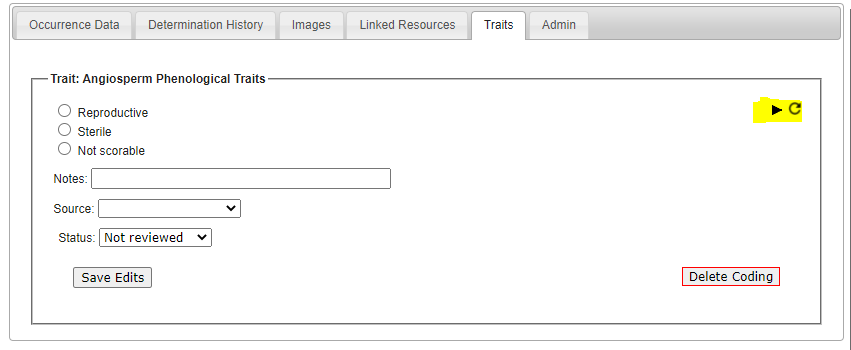
Traits are stored in a separate table than the main occurrence data and can be viewed for an occurrence in the Traits tab in the Occurrence Editor.
Traits can often be downloaded along with occurrence data as an extended measurementOrFact file.
Several tools have been developed to enable users to annotate specimen records for their traits, including the Trait Coding from Images tool and the Trait Coding from Text tool. The traits available to score vary between portals, and new traits can be developed as needed (contact your portal administrator for more information).
Scoring traits for a single specimen
Navigate to the Occurence Editor for the occurrence you wish to score (see this page for help finding specimens) and click on the Traits tab. Any traits available for scoring will be displayed in boxes in this tab. To view additional scoring optiosn for a given trait, click the black triangle at the top right of the box (highlighted below). From here, you can score the traits from any available images. You can also remove trait information by clicking the Delete Coding button.