Coordinate Validator
This page describes how to use the coordinate validator tool, located under the Data Cleaning toolbox.
Things to know before using this tool
This tool will only work as expected if your portal's geographic thesaurus includes geographic polygons, which can be added automatically by a superadministrator using the Geographic Harvester. Contact your Portal Manager if the tool does not seem to be functioning.
It is recommended to use the Geography Cleaning Tools before validating coordinates. This will ensure that your political units match those in the geographic thesaurus.
How to locate the Coordinate Validator
Navigate to these tools through the Administration Control Panel (click My Profile, then the name of the collection in the Collection Management box). Click Data Cleaning Tools, then view the box below the Specimen Coordinates header.
The Coordinate Validator tool can be used to determine whether the coordinates associated with your records actually fall within the political boundaries of the provided Country, State/Province, and County.
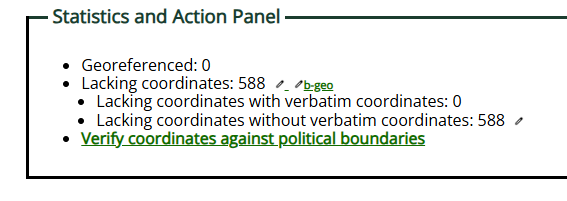
The Statistics and Action Panel provides information about how many of your specimens are georeferenced, as well as how many records with or without coordinates have data in the "verbatim coordinates" field. Non-georeferenced records with values in the "verbatim coordinates" field are a good place to start when you begin georeferencing, as they may have coordinates that can simply be converted into decimal latitude/longitude values.
How to run the Coordinate Validator
To use the Coordinate Validator Tool, click the Verify coordinates against political boundaries link.
If your collection has coordinates, you will see one of two things on the next page:
- If you have never validated your coordinates, you will see a table of "Unverified records listed by county." Click the table icon to view specimens belonging to the listed country values.
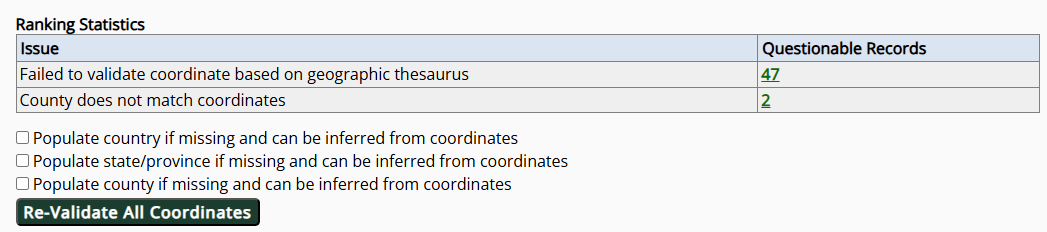
- If you have previously validated your coordinates, you will see a "Ranking Statistics" table consisting of all the potentially problematic records from the previous validation attempt.
To validate (or re-validate) your coordinates, check the boxes next to your preferred options. You can have the tool populate values for country, state/province, and/or county based on the coordinates for records that do not currently have values in those fields. Click the "(Re-)Validate All Coordinates" button to run the tool.
This tool may take several minutes to run! Do not navigate away from this window while the tool is running.
The resulting Ranking Statistics table will show totals of potentially problematic records based on the types of issues discovered, described below. To view records with the named potential issues, click the number in the Questionable Records column.
Explanation of potential issues discovered
Failed to validate coordinate based on geographic thesaurus
Records with this issue may:
- Have coordinates that didn't match within any county or state boundaries
- Have country/state/county values that do not match values in the geographic thesaurus
- Have country/state/county values that do not have a corresponding polygon in the geographic thesaurus.
Because polygons in the thesaurus are sometimes imprecise, you are likely to always have records in this category.
The tool can only fully validate coordinates for countries that have state and county polygons in the taxonomic thesaurus. Contact your portal administrator for help with countries that do not yet have sub-country polygons.
Failed to validate coordinate despite known search polygon
Records with this issue were unable to validate despite the country/state/county values matching values with polygons in the geographic thesaurus. This is usually due to imprecisions in the polygons in the geographic thesaurus. For example, coastlines may not perfectly match the polygons. It is a good idea to check these records for obvious issues, then ignore the remaining flagged records.
State/Province does not match coordinates
Records with this issue have coordinates that were found in the correct country, but the location of the coordinates does not match the given state/province value. Check these records for misplaced coordinates or mis-typed state/province values.
County does not match coordinates
Records with this issue have coordinates that were found in the correct country and state/province, but the location of the coordinates does not match the given county value. Check these records for misplaced coordinates or mis-typed county values.
Once you have fixed records that could not be validated (in the occurrence editor), you must re-run the validator to update your validation statistics.