Downloading Data
This page describes where and how you can download data from a Symbiota portal from the user interface and provides details on available download options.
How to Download
Downloading data from Symbiota portals can easily be done from a public search.
Most portals require you to be logged in to download data. If you don't already have an account, click the "Sign In" button and follow the link to "Create an Account". If you don't remember if you have an account or lost your login information, contact help@symbiota.org for assistance.
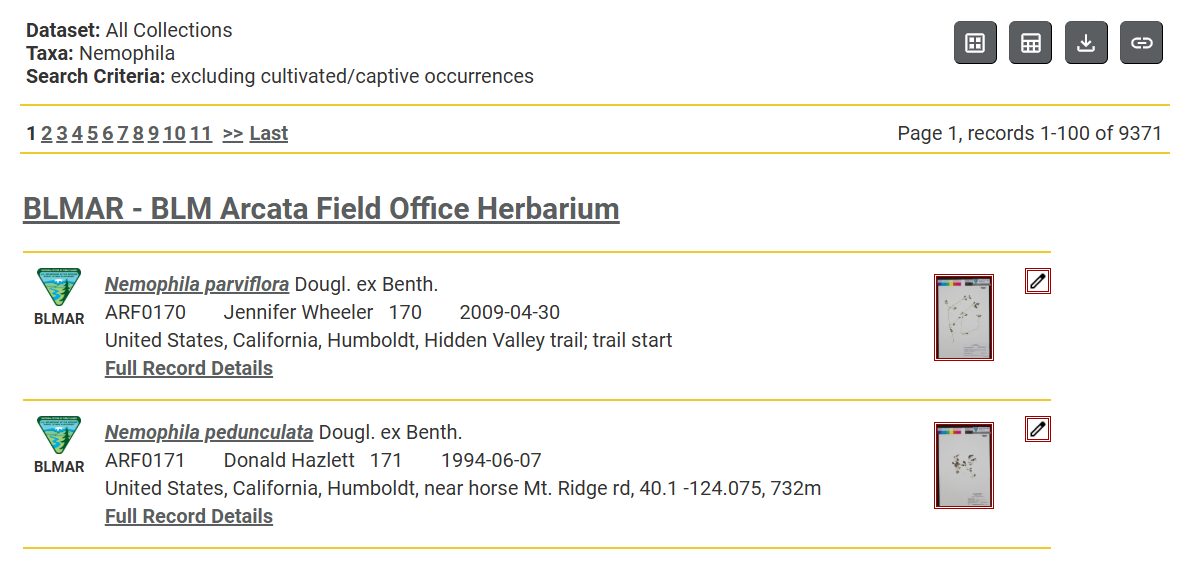
After conducting a search, click the download icon button 
This is usually displayed at the top right corner of the page, as shown below:
Download Options
Once you click the download button, a pop-up window will appear to provide your download options.
Make sure your pop-up blocker is disabled for this site to prevent issues with downloads.
You may see the following options (depending on what is available in your portal):
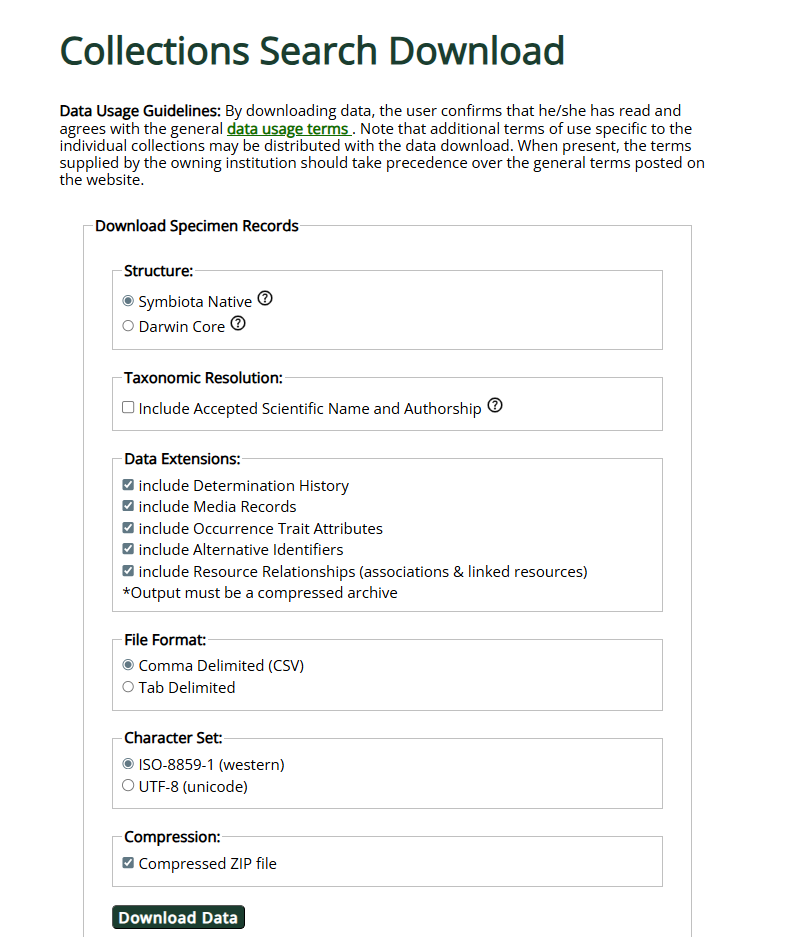
Structure - here you can select whether you want to download the data in the Symbiota format or in strict Darwin Core. Symbiota Native format includes several non-Darwin Core fields, such as substrate, associated collectors, and verbatim description. A complete list of Symbiota fields can be found on this page. Darwin Core is a more standardized, interoperable format that you may be better able to merge with downloads from other data sources.
Taxonomic Resolution - here you can select whether you would like to include the optional fields "acceptedNameUsage," "acceptedNameUsageAuthorship," and "acceptedNameUsageID". These fields will include information about the "accepted" scientific name of the specimen according to the portal's taxonomic thesaurus. The name provided on the record will still be reflected in the "scientificName" field of the downloaded occurrences file. Note that the accuracy of the accepted name depends on how well-curated the portal's taxonomic thesaurus is. See this article for more information about the taxonomic thesaurus.
Data Extensions - here you can select which Darwin Core extensions you would like to include in your download as described below. Extensions include data that may have a one-to-many relationship with records in the primary occurrences, i.e., there may be several rows in the extension files that correspond to a single row in the occurrences file.
- Determination History (file name: identifications) - this file will include the history of taxonomic identifications of records in the main occurrences file. See the Darwin Core Identification History Extension for information about fields available in this file.
- Media Records (file name: multimedia) - this file will include links to any media records associated with records in the main occurrences file. Note: this option will not download the actual media files associated with the records. See this article about Downloading Images for more information. See the Simple Multimedia Extension for information about fields available in this file.
- Occurrence Trait Attributes (file name: measurementOrFact) - this file will include trait data associated with records in the main occurrences file. Hierarchical traits will often include multiple rows. For example, a record with "flowers present" will inherit the trait "reproductive", and thus this record will include at least two rows of trait data for the single occurrence record. See the Extended Measurement Or Facts Extension for information about fields available in this file.
- Material Samples (file name: materialSample) - this file will include material sample data associated with records in the main occurrences file. See the GGBN Material Sample Extension for information about fields available in this file.
- Alternative Identifiers (file name: identifiers) - this file will include alternative identifiers (e.g., other catalog numbers) associated with records in the main occurrences file. These originate from the Additional Identifier table in the occurrence editor. See the Alternative Identifiers Extension for information about fields available in this file.
- Resource Relationships (file name: resourceRelationship) - this file will include associations and linked resources associated with records in the main occurrences file. These originate from the "Linked Resources" tab in the occurrence editor and may have been added individually or in batch. See the Darwin Core Resource Relationship Class for more information about fields available in this file.
File Format - here you can select whether you could like the files in your download to be comma-delimited (CSV) or tab-delimited (TSV)
Character Set - here you can select whether you could like the files in your download to follow ISO-8859-1 (western) encoding or UTF-8 (unicode) encoding. UTF-8 is recommended for best interoperability with most systems and non-English languages.
Compression - check this box if you would like your downloaded file to be compressed into a ZIP file. This will decrease the size of the file and therefore lead to quicker downloads. To view the files, simply extract them (search a browser for "How to Extract a Zip File").