Fossil Specimen Data
This page describes how to add and edit data associated with fossil specimen occurrences. The features described on this page will only be visible if features related to paleontological collections have been configured in your portal.
⚠️ Fossil specimens have distinct data requirements from recent biological ("neontological") collections. For discipline-specific advice regarding the digitization and general management of paleontological collections data, please refer to the Paleo Data Knowledge Hub.
Orientation
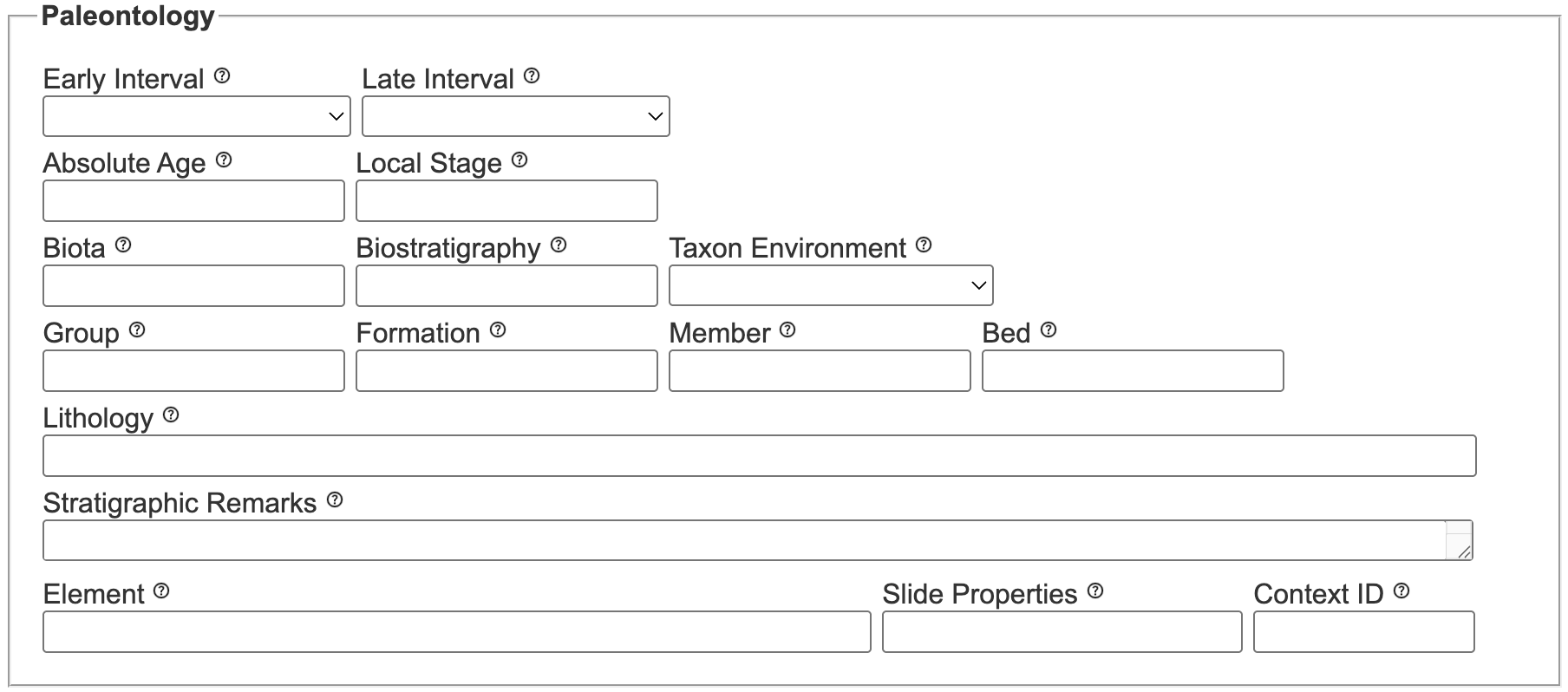 Information specific to fossil specimens, such as geological age and rock units, can be recorded in the "Paleontology" section of the Occurrence Editor form, which is informally referred to as the "Paleo Module". Before entering data associated with fossil specimens, Data Editors should review the associated data field definitions. Additional guidance on direct data entry specific to fossil specimens (for this module, as well as the entirety of the Occurrence Editor) is maintained in the Paleo Data Knowledge Hub.
Entering chronostratigraphic data
Data related to geological time (e.g., chronostratigraphic/chronometric data) can be captured using several fields, including: Early Interval, Late Interval, Absolute Age, and Local Stage.
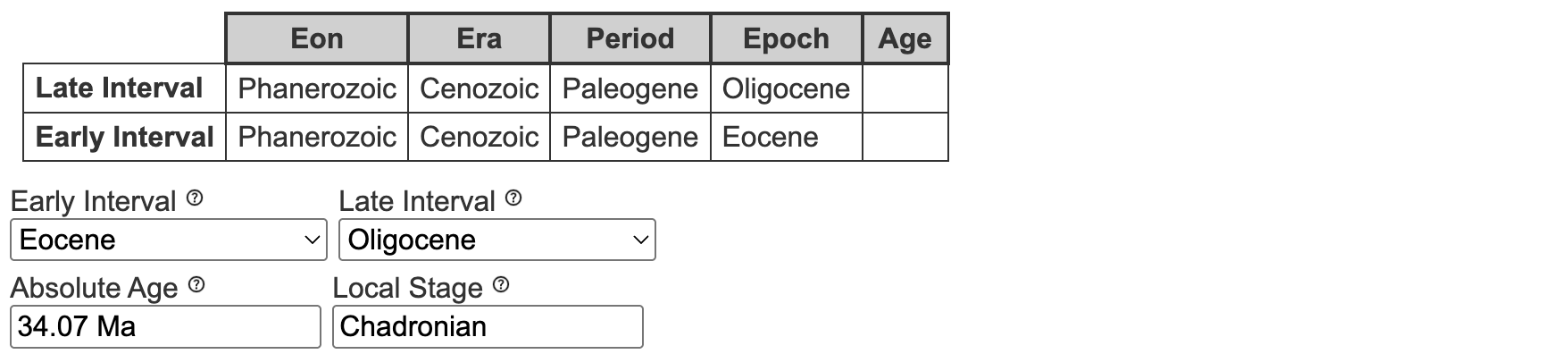
In order to promote data interoperability, Early Interval and Late Interval rely on a controlled vocabulary standardized within a given Symbiota portal. Unless your Portal Manager has indicated differently, the default values for this table are based on the International Commission on Stratigraphy's (ICS) Chronostratigraphic Chart.
There are several important things to know before entering data associated with the geological time:
- Every Early Interval value entered should have a corresponding Late Interval value, even if the values are the same.
- Values entered into Early Interval and Late Interval should be logical, i.e. the Early Interval value should be either the same as or geologically older than the Late Interval value.
- Once entered correctly, a table will appear to display the higher-ranking values that have been backfilled by your portal (e.g., eon, era, etc.). If a value that does not comply with the portal’s underlying geological time vocabulary, the table will not display and an error message may appear.
Again, refer to the ICS time scale when entering these values unless directed differently by your Portal Manager. Note that
Lateis preferred overUpperandEarlyis preferred overLower(e.g.,Late Cretaceousis the preferred value overUpper Cretaceous).
For example:
| Early Interval | Late Interval | note |
|---|---|---|
Eocene | Oligocene | ✅ correct data entry |
Eocene | Eocene | ✅ correct data entry |
Oligocene | Eocene | ❌ illogical order |
Eocene | (null/blank) | ❌ null values not allowed |
| (null/blank) | Oligocene | ❌ null values not allowed |
A warning will appear if the values for Early Interval and Later Interval are entered incorrectly.
What if I have a geological time-related value that doesn’t appear in the list?
Many fossil specimens are accompanied by labels, field notes, and other primary data sources containing values will not appear in the controlled vocabularies specified for Early Interval and Late Interval. For example, this includes values that are regionally restricted (e.g. Wolfcampian), no longer accepted (e.g. Tertiary, Late Permian), informally used (e.g. Precambrian), and/or indicate uncertainty (e.g., Cretaceous?), among other possible scenarios. This information is important and should be recorded; however, it should not be captured using Symbiota’s Early- and Late Interval fields, as described above. Refer to the instructions below for guidance on how to deal with values that do not appear in the Early- or Late Interval lists.
Regionally accepted values
Values from regionally accepted time scales (such as those in these lists) should be recorded using Local Stage. In addition to using Local Stage to record regionally accepted terms, indicating time-equivalent values using Early Interval and Late Interval will make your records more broadly discoverable (within and beyond Symbiota).
For example:
| Early Interval | Late Interval | Local Stage | explanation |
|---|---|---|---|
Asselian | Asselian | Nealian | Nealian is specific to the Permian of North America |
Tremadocian | Tremadocian | Tremadoc | Tremadoc is specific to the Ordovician of Great Britain |
Ypresian | Lutetian | Wasatchian-Bridgerian | Watsatchian and Bridgerian are land mammal ages specific to North America |
Uncertainty, unaccepted values, and similar scenarios
In the absence of an appropriate, standard-based term to record these data, verbatim values that record uncertainty and antiquated information should be captured in Stratigraphic Remarks as a key:value pair (demonstrated below) to enable future parsing.
For example:
| Early Interval | Late Interval | Stratigraphic Remarks |
|---|---|---|
Late Miocene | Late Miocene | [VERBATIM CHRONOSTRATIGRAPHY: Upper Mio?] |
Permian | Permian | [VERBATIM CHRONOSTRATIGRAPHY: Late Permian?] |
Paleogene | Neogene | [VERBATIM CHRONOSTRATIGRAPHY: Tertiary] |
Querying fossil specimen data
When a portal is configured for managing and sharing fossil specimen data, geological context data associated with fossil collections can be queried by:
- Using your portal's public search form and Map Search interface (instructions)
- Using the Data Editor search form (instructions)
The main difference between using the publicly visible search forms versus the Data Editor search form to retrieve fossil specimen records is how they retrieve data associated with geological time (i.e., Early Interval, Late Interval). Specifically, the public search forms will produce time-inclusive search results, whereas the Data Editor search form will produce literal search results.
For example:
- If you want to find all records where "Paleocene" was the literal/actual value entered for Early Interval or Late Interval, use the Data Editor search form.
- If you want to find all records associated with the Paleocene epoch, use the public search form, which will return not only records where Early Interval (or Late Interval) was entered as as "Paleocene", but also records entered as "Danian" or any other geological time intervals contained within the Paleocene.